If you are searching for a skate tree roblox beginner route, start with control rather than difficult tricks. Learn to move, turn, jump, and land in the opening area, then build a short line you can repeat. After that, use a Marker to reduce travel time, explore a larger Skate Spot, and only then test yourself in Spot Battle.
Your first session
Connect a controller if you have one: the game's guidance and several gameplay demonstrations present it as the more comfortable input option. Keyboard play is still possible, but the exact key layout is not fixed here; follow the prompts currently shown in Skate Tree rather than copying a control list from another version.
Spend your first practice session on four things:
- Move forward and change direction without losing control.
- Approach a small ramp at a manageable speed.
- Jump and land with the board aligned to the route.
- Repeat the same short line until the landing is predictable.
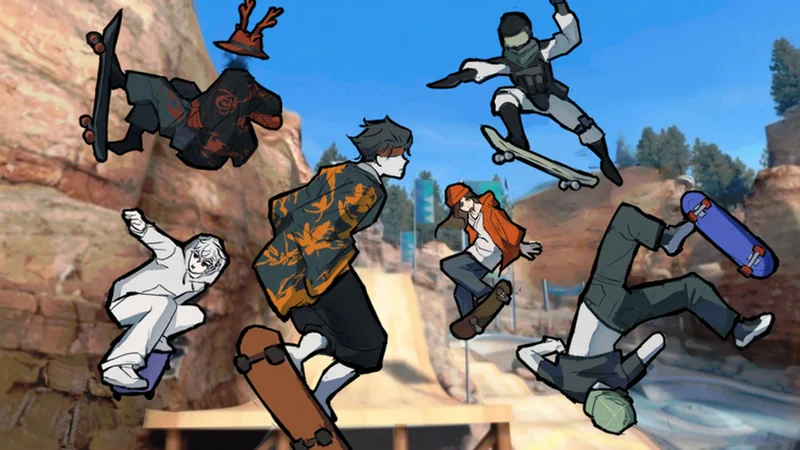
Use a Skate Spot to practice movement, landings, and repeatable Trick lines. Source: Wiki, reviewed October 22, 2026.
The available trick set includes basics such as Ollie, Kickflip, Heel Flip, Pop Shove-it, 180, Manual, Grind, Revert, and Board Throw. Treat those names as the range of actions available, not as a required order or a fixed keyboard chart. Your next useful trick is the one you can land consistently.
A safe progression route
Use this route when deciding what to do next. It deliberately moves from control to exploration, then to rewards and competition.
Beginner progression route
| Stage | What to do | Move on when |
|---|---|---|
| 1. Control | Practice movement, turning, jumping, and landing | You can finish a short line without repeatedly bailing |
| 2. Basic line | Connect a Trick with a Manual, Grind, Revert, or the next ramp | You can repeat the line and recover from a missed action |
| 3. Explore | Use Fast Travel to visit Mega Park, Mega Bowl, or a suitable Street Spot | You know where to practice and can return without wandering |
| 4. Protect practice | Place a Marker near the difficult section before trying it | Resetting no longer costs a long trip back to the route |
| 5. Compete | Try a Spot Battle after building a reliable line | You can keep a run going without relying on one risky trick |
The table is a practical order, not an unlock list. Mega Park is suited to ramps, rails, jumps, and longer lines; Mega Bowl favors bowl movement and repeated turns. Street Spots provide rails, ledges, ramps, and connected routes. Which area is best depends on the skill you are practicing.
Markers, Reset, and recovery
Place a Marker before entering a difficult section. Demonstrations show it functioning as a practice spawn point, so it is especially useful when a route requires several attempts. If you fall at the edge of a map or lose your line, use Reset to recover. Without a nearby Marker, Reset may send you back to Spawn instead of the section you were learning.
This gives you a simple recovery rule: Marker first, difficult attempt second. If a line fails, return to the Marker, reduce the approach speed or remove the riskiest trick, and try the same route again. Do not spend each attempt crossing the map just to reach the practice area.
Set up a Marker and reach a practice area
These moments show the controller and Mega Park context, then demonstrate using a Marker as a return point while practicing.

Coins, Points, and the Board Shop
Successful Tricks are shown producing Coins, while Points are associated with performance, continuous lines, Spot Battle results, and leaderboards. The available evidence does not establish that the two resources are interchangeable or document a complete conversion rule, so treat them as separate until the current interface says otherwise.
Use the reward loop like this:
- Practice a repeatable Trick or line.
- Keep the landing clean instead of forcing a higher-risk action.
- Check whether the activity awarded Coins or Points.
- Open the Skateboard Shop before spending and inspect the item’s current cost.
The shop includes board-facing customization such as Skins, Designs, Colors, Decals, and Limited Boards. One gameplay demonstration mentions a board example costing as much as 50,000 Coins; that is an example, not a universal price. Daily Rewards and Group Rewards are also mentioned in the game flow, but their exact amounts and requirements can change, so use the current reward screen as the authority.
Keep board appearance separate from avatar customization. Avatar, Style, and Avatar Creator options change the character presentation; they do not establish a board upgrade, a new trick input, or better landing performance.
When to enter Spot Battle
Choose Game Modes → Spot Battle after you can complete a short line reliably. The mode places players in a shared competition where successful actions and maintained lines affect the result. A large trick is not automatically a good beginner choice: a clean, repeatable sequence can be more useful than a difficult attempt that ends the run.
Join a Spot Battle after building a reliable line
This moment supports the Spot Battle section by showing the mode in action and how players' runs shape the competition.

Before queueing, prepare one safe line and one optional extension. Place a Marker near the start, use the safe line first, and add the extension only when you have enough control. Expect experienced players to score beyond a new player's early runs; use the first matches to learn pacing and recoveries rather than treating one result as a measure of your whole progression.
Common beginner mistakes
- Copying exact controls from an old video: device prompts and updates may differ. Read the current in-game input hint.
- Starting with the hardest trick: replace it with a basic action you can land, then add complexity one step at a time.
- Skipping the Marker: set the return point before a long route or a difficult ramp.
- Using Reset without a plan: Reset may return you to Spawn, so place a Marker first.
- Treating Coins and Points as the same resource: check which balance the activity and shop actually use.
- Entering Spot Battle too early: build a repeatable line in practice before adding another player and a score.
What to do next
Your next goal is not a maximum score. Choose one Skate Spot, place a Marker, and make one short line repeatable. Then collect a few rewards, inspect the Board Shop, and try a Spot Battle when you can recover from a missed landing. Revisit Daily Rewards, Group Rewards, Candy Hunt, and Limited Boards when they are visible in the current menus; their schedules and reward details are not fixed in the available guide evidence.
FAQ
Is a controller better for Skate Tree?
The game guidance and gameplay demonstrations recommend a controller, but keyboard play is also available. Use the current in-game prompts because exact inputs can vary by device or update.
What should I do before trying Spot Battle?
Practice a short, repeatable line, place a Marker, and prioritize clean landings over risky tricks. Spot Battle scores depend on successful actions and keeping the line going.
How do I get Coins in Skate Tree?
Successful Tricks are shown awarding Coins. The complete relationship between Coins, Points, and every shop item is not documented, so check the current shop before planning a purchase.
SourcesReviewed October 22, 2026
https://www.skatetree.wiki/guide/Skate-Tree-beginner-guide
https://www.skatetree.wiki/guide/Skate-Tree-how-to-play
https://www.skatetree.wiki/battles/Skate-Tree-skate-battles
https://www.roblox.com/games/75885533927852/Skate-Tree
The guide uses public game-guide pages, gameplay demonstrations, and the Roblox listing available for review on October 22, 2026. Exact controls, shop prices, reward amounts, event schedules, and some mode availability can change. The cited material supports the beginner route, Marker recovery advice, broad reward flow, and Spot Battle strategy, but it does not establish a complete control chart, a full price list, or a conversion rule between Coins and Points.